











Why designing your own tumbler is easier than you think
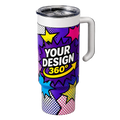
Most people assume custom drinkware requires design software experience, a minimum order of 50 units, or sending files back and forth with a print shop for days. None of that is true with the Tawgraphix 3D tumbler designer. You upload your artwork, see it wrapped around a real 3D tumbler preview in real time, choose your finish, and check out. The entire process takes a few minutes.
The designer is built for everyone — whether you have a polished logo file ready to go, a photo you want on a tumbler, or a simple text-based design you are building from scratch. If your file is clear and high resolution, the print will be clean and professional. This guide walks you through every step so you know exactly what to expect before you start.
Watch the full walkthrough video above before you start if you want to see the entire process in real time. The steps below match the video exactly so you can follow along or refer back to any specific point.
Before you start — what to prepare
Taking two minutes to prepare your file before opening the designer saves time and produces better results. Here is what to have ready.
- Your artwork file — PNG or JPEG. PNG with a transparent background is best for logos and designs where you do not want a white box around the image
- High resolution — 2000px wide or larger. The designer will accept smaller files but larger images produce noticeably sharper print output
- Know your tumbler size — decide whether you want a 20oz, 30oz, or other available size before you open the product page, since selecting a size loads the correct template
- Know your finish preference — glossy for a brighter reflective look, matte for a softer more understated feel
Avoid screenshots and screen-captured images. Screenshots are typically 72 DPI and look fine on a screen but print soft and pixelated. If you only have a screenshot of your logo, try to obtain the original file from whoever designed it. Most designers can provide a PNG export at full resolution.
Step 1 — Choose your tumbler size
On the Tawgraphix custom tumbler designer product page, the first thing you do is select the tumbler size you want. This is not just a size selection for shipping — it loads the correct 3D template and workspace dimensions for that specific tumbler shape. Selecting the right size first means your design preview will accurately reflect what the finished product looks like.
If you are unsure which size to choose, the 20oz is the most popular option for everyday use and individual gifts. The 30oz is preferred for larger capacity tumblers and is a common choice for bulk business orders where people want a more prominent branding surface.
Step 2 — Upload your artwork
Once you have selected your size, click Upload Image or drag and drop your file directly into the design area. The designer accepts PNG and JPEG files. Your image loads into the workspace and appears on the 3D tumbler preview immediately.
If your design has a transparent background (a PNG with no white fill behind it), the tumbler's base color or finish shows through in those areas, which is typically the cleanest and most professional result. If your file has a white background, that white will print as a solid white area on the tumbler — which is sometimes intentional but often not, so check your preview carefully after uploading.
Step 3 — Position and preview your design
After uploading, you can move, resize, and rotate your artwork directly inside the editor. The 3D preview updates in real time as you make adjustments, showing you how the design wraps around the actual tumbler shape. This is where most people spend the most time — and it is worth taking a few extra minutes here to get the placement right.
- Center your design both horizontally and vertically for the most balanced look, especially for logo-only designs
- Scale up to fill the surface if your design is a full-wrap pattern or background — small designs on a large tumbler can look undersized and underwhelming at the finished product scale
- Check the wrap edges — if your design extends near the top or bottom edge, confirm in the preview that important elements are not getting cut off at the rim or base
- Rotate for orientation — if your design has text or a directional element, make sure it reads correctly when the tumbler is held in a natural grip position
Spend time in the preview. It exists precisely so you do not receive a finished tumbler and wish you had moved something two inches to the left.
Step 4 — Choose your finish
Tawgraphix offers two finish options and the difference is visible and worth thinking about before you select.
Glossy (with varnish)
A reflective finish that makes colors appear brighter and more saturated. Glossy tumblers photograph well and have a polished premium look. If your design has bold colors or photographic elements, glossy tends to make them pop. The surface has a slight shine that is noticeable in person and in photos.
Matte (no varnish)
A smooth non-reflective finish that gives the tumbler a more understated, modern feel. Colors appear slightly less saturated than glossy but the overall look is clean and refined. Many businesses prefer matte for branded merchandise because it photographs without glare and feels more premium to the touch.
There is no objectively better choice — it depends entirely on your design and the aesthetic you want. When in doubt, glossy for bold colorful personal designs; matte for branded business merchandise.
Step 5 — Add to cart and place your order
Once your design looks right in the 3D preview and you have selected your finish, click Add to Cart and complete checkout. Your order moves into production based on the exact artwork, size, and finish options you selected in the designer.
Every tumbler is produced with professional print equipment, carefully packaged, and shipped with tracking. You do not need to send any additional files after checkout — the designer captures everything at the time of your order.
Pro tips for the best custom tumbler results
Use PNG with transparent background for logos
The single biggest quality improvement most people can make. A PNG with transparency means your logo sits cleanly on the tumbler surface with no white box border. If you do not have a transparent PNG, ask your designer for one or use a free background remover tool before uploading.
Go bigger with your design scale
New users consistently undersize their designs in the preview. What looks large on screen often looks smaller on the physical tumbler in person. Fill the available print area more than feels necessary — the finished product will look more intentional and polished at larger scale.
For bulk orders, proof one tumbler first
If you are ordering 20 or more tumblers for a business, event, or team, consider ordering a single unit first to confirm placement, finish, and color before committing to the full quantity. This is standard practice in professional merchandise production for good reason.
Check your preview on a phone screen
After arranging your design in the desktop editor, pull up the 3D preview on a phone screen. Mobile screens show you approximately how the tumbler will look in hand at real size. If something looks off at phone scale, adjust it before ordering.
What people are ordering custom tumblers for
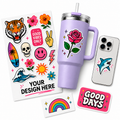
Custom tumblers have become one of the most versatile branded products available — useful enough that people actually use them, visible enough that they function as ongoing brand impressions, and personal enough to work as gifts. Here is what Tawgraphix customers are creating.
- Personalized gifts — names, photos, inside jokes, and meaningful artwork for birthdays, holidays, graduations, and anniversaries
- Small business branding — logo tumblers for sale in shops, at markets, and online as branded merchandise
- Corporate and employee gifts — branded tumblers for onboarding kits, appreciation gifts, and client gifts
- Event merchandise — weddings, reunions, fundraisers, tournaments, and team events where a custom tumbler serves as both souvenir and keepsake
- Creator and influencer merch — content creators, Etsy sellers, and social media brands selling custom drinkware to their audiences
Frequently asked questions
PNG files with transparent backgrounds produce the cleanest results for logos and designs. JPEG works well for photographic images. Submit at 2000px wide or larger for the sharpest print. Avoid screenshots — they are low resolution and print soft regardless of how they look on screen.
Yes. The 3D designer shows a live preview that updates in real time as you move, scale, and rotate your design. You can inspect the placement from different angles before adding to cart. What you see in the preview is what gets printed.
Glossy (varnish) gives a reflective shine that makes colors appear brighter and more saturated — great for bold colorful designs and personal gifts. Matte (no varnish) gives a smooth non-reflective surface that looks clean and modern — popular for branded business merchandise. Neither is objectively better; it depends on your design and the look you want.
You can order a single tumbler. There is no minimum order requirement. This makes the designer equally practical for one personalized gift or a bulk order for a business or event.
Multiple sizes are available on the product page. Select your size first before opening the designer — this loads the correct template dimensions for that specific tumbler shape so your preview and print match accurately.
Yes — if your PNG or JPEG has a white background, that white area will print on the tumbler. To avoid this, you need a PNG with a transparent background where the background has been removed. You can ask your original designer for a transparent PNG, or use a free background remover tool like remove.bg before uploading.
Every tumbler is produced and shipped with tracking. Check the product page or your order confirmation for current production and delivery estimates for your specific location. Tawgraphix ships nationwide across the USA.


